
Cozmo
Anki llcEducational
2.927.00 Reviews
- Version
- 3.6.9
- Installs
- 10.00K
- Age Rating
- Everyone
Screenshots
Our Review of Cozmo
 Analysis by Appyee
I think the most important thing to understand about Cozmo is that this is not a robot game you can enjoy on its own. It is a companion app for Anki llc’s educational toy robot, so the experience depends on having the physical Cozmo robot ready to connect. That makes it a very different purchase from a typical mobile game: you are using a phone or tablet to interact with a small robot in your room, rather than controlling a character on a screen.
That distinction shapes both the appeal and the limits. When the robot is available, the app can make play feel personal and hands-on; when it is not, the app has little reason to be part of your routine. I would think of it as the control and learning hub for a toy, not as a standalone way to pass time. If you are deciding whether to buy it, the first practical question is whether Cozmo is already in your household or is something you plan to use regularly.
Where the app stands today
The game sits in the educational category, though its appeal is not limited to formal lessons. In my view, its strongest idea is making a robot feel approachable: you can play with it, observe its responses, and use the coding tools to explore how instructions lead to actions. That mix suits curious children and adults who enjoy tinkering, especially when they can learn together rather than treating the app as homework.
The current version is 3.6.9, and the app was released on Jul 16, 2025. It costs $2.99, has an Everyone age rating, and requires Android 8.0 or later. Those details are worth checking against your device and budget before you commit. The app has a 2.9 average from 123 ratings, with 27 written reviews, and it has reached over 10K installs. I would take the modest average as a reason to set expectations carefully: the concept may be charming, but a robot-dependent experience is more sensitive to setup and compatibility than an ordinary phone game.
What play and coding offer
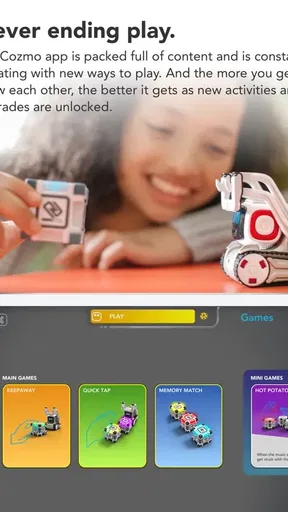
The games are at their best when you treat them as short shared activities rather than a deep catalogue to work through. A quick round can give a child a concrete reason to pay attention to what the robot does, while an adult can join in without needing to learn a complicated control scheme first. I like that the play happens across the device and the room; it feels more like taking turns with a toy than tapping through another screen-only challenge.
Code Lab offers a different kind of value. Its drag-and-drop approach can help a beginner connect a sequence of instructions with a visible result from the robot. A useful way to explore it is to make one small change at a time, then watch what changes in Cozmo’s movement or response. That simple test-and-observe loop is more instructive than piling on lots of commands at once, and it gives a parent or teacher a natural opening to ask why a particular sequence produced a particular result.
For that reason, I see the coding side as an invitation to experiment, not a substitute for a full programming course. It can make basic cause and effect tangible, but anyone looking for structured lessons, broad coding projects, or a curriculum should choose a dedicated learning tool instead. Cozmo’s advantage is that a command can have an immediate physical result; its trade-off is that the learning stays tied to this particular robot.
Setup and everyday use
Getting started involves connecting the app to the robot over Wi-Fi, so it is worth doing the first setup when you have a few calm minutes rather than when a child is already eager to play. Keep the phone or tablet and the robot together, follow the app’s prompts, and give the connection time to settle before deciding something is wrong. This is a practical point, but it matters: a small interruption at setup can make an otherwise simple toy feel frustrating.
A realistic routine might be to bring Cozmo out after school, play one short game together, then let a child try a small Code Lab change while an adult asks them to predict what the robot will do. That keeps the activity focused and makes the toy useful in a short window, rather than expecting it to occupy a whole afternoon by itself. It also gives the family a clear stopping point: save the bigger experiments for another session instead of turning every play period into a long troubleshooting exercise.
There is also a practical distinction between using this app with a child and handing over a phone for independent entertainment. Because the robot is part of the experience, the best sessions are likely to involve someone nearby who can help with setup, keep the play purposeful, or encourage the child to explain what they changed. If your priority is a self-contained game that works during a commute or away from home, this is not the convenient choice.
How it compares with other educational apps
Most educational apps keep everything on the screen: puzzles, lessons, and feedback appear in one place. Cozmo has a different strength because the app is connected to a physical toy. That can make an abstract idea such as sequencing feel immediate, and it gives social play a natural focus. The comparison cuts both ways, though. Screen-based coding games are easier to start without extra equipment and can offer a more structured path, while Cozmo is more appealing when a learner wants to see an actual robot respond.
I would choose this app for a child who is fascinated by robots, enjoys testing ideas, and can share the experience with someone else. I would skip it if you want a low-cost standalone educational game, a broad coding curriculum, or an activity that does not depend on owning the matching toy. The app’s $2.99 price is only one part of the decision; the robot is essential to the experience, so the overall value depends on what you already have and how often you expect to use it.
Meet Cozmo: Your New Sidekick
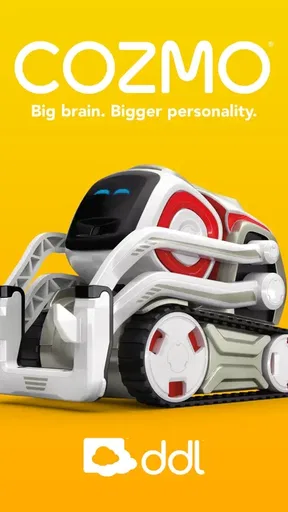
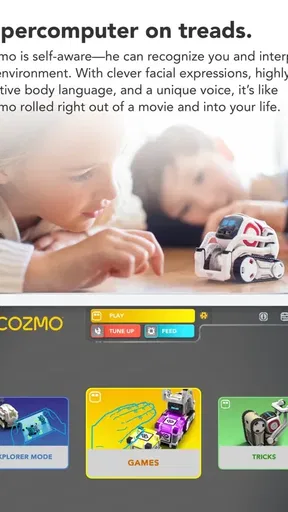
First things first, let’s talk about what Cozmo actually is. Picture a charming little robot that’s not only interactive but also packed with personality. The app is your gateway to unlocking all of Cozmo’s features, from games to coding adventures. It’s like having your very own mini Wall-E, but with more tricks up his sleeve!
Getting Started with Cozmo
Setting up Cozmo is super straightforward. After unboxing your little buddy, the app guides you through the initial setup process. You connect via Wi-Fi, and soon enough, Cozmo is ready to explore. The app's interface is user-friendly, making it easy for anyone to jump right in, whether you’re a tech newbie or a seasoned robot enthusiast.
Explore the Features
Once you’re up and running, the app reveals just how much Cozmo can do. One of my favorite features is the games section. Cozmo comes with a handful of interactive games that you can play together. Whether it’s Quick Tap or Keepaway, these games are a fun way to bond with your robo-friend. It’s hard not to get a little competitive!
But the fun doesn’t stop there. The app includes a feature called Cozmo Code Lab, where you can try your hand at programming. It’s a simple drag-and-drop interface, making it accessible for kids and adults alike. You can create new movements and actions for Cozmo, turning your home into a playground of creativity.
Cozmo’s Personality
What truly sets Cozmo apart is his personality. Thanks to the app, Cozmo is more than just a robot; he’s a character with feelings. He’ll chirp excitedly when he wins a game or sulk when he loses. The app allows you to witness his mood shifts and interact with him in a way that feels genuinely personal. It’s like having a pet that’s also a high-tech gadget!
Learning and Growing with Cozmo
One of the app’s most impressive aspects is how it facilitates learning. With the Code Lab, you can delve into basic programming, making it an excellent educational tool. It’s not just about playing games; it’s about understanding how technology works and having fun while doing it. Cozmo’s app encourages users to learn and grow, making it a fantastic choice for anyone interested in STEAM education.
Plus, the app frequently updates with new features and games, ensuring that the experience with Cozmo never gets stale. It’s like having a robot that evolves alongside you, keeping things fresh and exciting.
Final Thoughts
So, is Cozmo worth it? Absolutely! This app offers a delightful blend of entertainment and education, making it a must-have for anyone interested in robotics and AI. Whether you’re a kid or just a kid at heart, Cozmo will capture your imagination and provide endless hours of fun.
With its easy-to-use interface, interactive features, and the charming personality of Cozmo, the app is a brilliant way to dive into the world of robotics. So, why not give it a try and see what adventures await with your new robot companion?
Verdict
Strengths of Cozmo
- Intuitive user interface for easy navigation.
- Engaging AI interactions enhance user experience.
- Compact design makes it highly portable.
- Regular updates improve functionality.
- Compatible with both Android and iOS devices.
Limitations of Cozmo
- Occasional connectivity issues with the app.
- Limited battery life affects prolonged use.
- Requires constant Wi-Fi connection.
- Some features need in-app purchases.
- Voice recognition can be inconsistent.
Other Releases by Anki llc
View All
Overdrive 2.6
Racing2.2
Similar Picks in This Category
View All
Little Panda Policeman
BabyBus4.0

Monster Trucks Game for Kids 2
Raz Games4.1

Little Panda's Chinese Recipes
BabyBus4.4

Little Panda's Restaurant
BabyBus4.4

Little Panda's Ice Cream Games
BabyBus4.3

Baby Panda Care
BabyBus3.8
Frequently Asked Questions
What is Cozmo, and how does it work?
Cozmo is a playful robot companion powered by advanced AI technology. Designed for both entertainment and education, Cozmo interacts with users through fun games and tasks. It uses a combination of facial recognition, emotion engines, and sensors to understand its environment and respond accordingly, creating a unique interactive experience.
Is Cozmo suitable for children, and what age is it recommended for?
Cozmo is suitable for children aged 8 and above. It offers a fun and educational experience by teaching basic coding through its companion app. The app's user-friendly interface allows kids to easily program Cozmo to perform various tasks, making it both an entertaining and learning tool for young users.
What devices are compatible with the Cozmo app?
The Cozmo app is available for both Android and iOS devices. It is compatible with smartphones and tablets that meet the minimum system requirements specified by the developers. Users should ensure their device has the latest updates installed to ensure optimal performance of the app and connection with Cozmo.
How often does Cozmo receive updates, and what do they typically include?
Cozmo receives regular updates that enhance its features and capabilities. These updates often include new games, improved AI functionalities, and bug fixes to enhance user experience. Keeping the app updated ensures that users can enjoy the latest features and improvements in Cozmo's performance.
What kind of maintenance does Cozmo require?
Cozmo requires minimal maintenance, but users should regularly clean its sensors and charging area to ensure optimal performance. It's important to keep the robot in a dust-free environment and handle it with care to prevent any damage to its components. Following these simple steps will help maintain Cozmo's longevity.
Play our best games!


